How to Choose the Right Website Platform
Choosing a website platform can become an unexpectedly consuming hobby. You start out needing somewhere to explain your services and finish three evenings later comparing features for a business model you haven’t actually planned. Someone recommends Shopify because their online store is going well. Someone else loves Squarespace because they built their portfolio over a weekend. Both recommendations may be perfectly reasonable, but neither tells you much until you know what their website needs to do compared with yours.
I primarily build websites on Squarespace and Shopify. Both can produce a beautiful, useful website, and both give business owners ways to manage their content after launch. I recommend them for different reasons, depending on how the business works and what customers need from the site.
So before you get emotionally attached to a random template and spend your weekend starting a new project, here’s how I’d approach the choice.
Start with the main job of your website
Most websites have several jobs. They might introduce the business, explain services, publish articles, collect enquiries and sell products. The useful question is which of those jobs is central to how you earn your income.
If you’re a consultant, designer or service business, your website may need to help someone understand your expertise, feel confident about your work and make an enquiry. A retailer needs that confidence too, but also needs customers to find the right product, select an option, pay and receive their order, while the business keeps track of what’s happening behind the scenes.
That difference influences where I’d start. For a website centred on services, a portfolio or editorial content, I’ll often consider Squarespace first. For a business where selling products and managing retail operations are central, I’ll usually start with Shopify.
There’s overlap, of course. Squarespace can sell products, and Shopify can explain services and publish content. The decision becomes clearer when we look beyond whether a feature exists and consider how much of your business depends on it.
Where Squarespace makes sense
Squarespace is often a good fit when the website needs to communicate the business clearly, present its work and guide people towards an enquiry or booking. It offers tools for portfolios, blogs and online selling, with scheduling available through Acuity. The relevant subscriptions and setup still need checking against your requirements.
For many of the businesses I work with, the appeal is having a website they can keep up to date without turning every small change into a separate project. We can create a considered design and establish how the content should work, then give the team a manageable way to maintain it.
The advantages
Squarespace gives us a useful starting point for bringing together your message, photography, services and work. That suits businesses where people need to read, look around and get a feel for the business before taking the next step.
It can also be a sensible choice when selling is one part of the website rather than its entire purpose. An artist might need a portfolio, exhibition information, articles and a shop. The important thing is to check how that shop needs to operate before deciding it’s straightforward.
What I’d look at carefully
As the requirements become more involved, I’d spend more time testing the details. Product options, shipping arrangements, bookings and connections to other systems can all influence whether the setup will be practical.
A feature being available doesn’t necessarily mean it works exactly as your business needs it to. Sometimes an additional tool is a perfectly sensible solution. Sometimes we’re starting to construct an elaborate workaround for something another platform handles more naturally.
I’d rather identify that before we’ve designed the whole website around it. Nobody enjoys discovering that the apparently small requirement mentioned in passing is now the main character.
Where Shopify makes sense
Shopify is usually my starting point when online retail is a core part of the business. Its tools centre on commerce, including products, checkout, orders, inventory and selling across different channels.
That matters because a retail website has two audiences: the customers buying from it and the people running it. The front needs to make shopping clear and appealing, while the back needs to support the everyday work of selling.
A lovely homepage is useful. So is knowing how many blue dresses in a size 12 you actually have.
The advantages
Shopify gives us a foundation built around selling, which makes it worth considering when the product catalogue and retail processes deserve most of our attention.
It also offers themes, custom development options and an app ecosystem that can extend what the store does. Those options give us room to assess more specific requirements as the business develops.
From a design perspective, we can still communicate the brand, tell its story and create useful content. Choosing a commerce platform doesn’t mean the website has to lose its personality.
What I’d look at carefully
Apps can be useful, but they also deserve a budget and a reason to be there. Before adding one, I’d want to understand what it solves, how it works with the rest of the store and who will look after it.
Design changes also need to be assessed against the chosen theme. Some will be routine content edits; others may involve a developer. It’s worth establishing that distinction before assuming every future idea will be a quick adjustment.
For a service business needing a relatively straightforward enquiry website, I’d also ask whether the retail focus is useful enough to justify choosing Shopify. Buying a substantial shop system in case you might sell something one day can leave you managing a lot of potential.
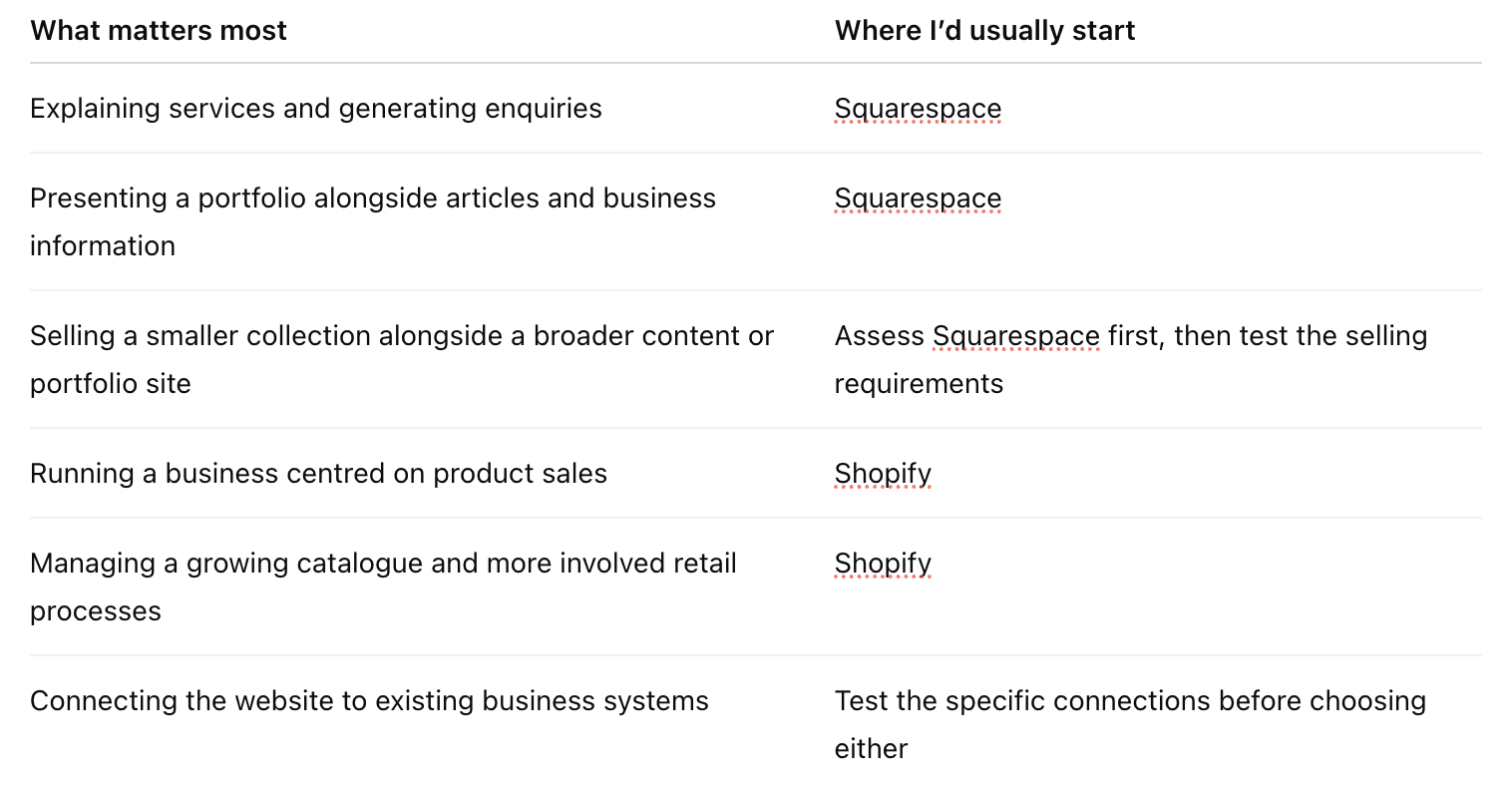
A quick comparison
These are starting points for a conversation. The number of products alone won’t decide it: a small range with complicated purchasing requirements can need more investigation than a much larger, straightforward catalogue.
Compare the ongoing work and the full cost
Whichever platform you choose, someone still needs to maintain the content, check the customer experience and keep the business information accurate. A hosted platform reduces some of the technical administration, but the website will continue to need attention.
Ask to see the tasks you’ll do regularly. Can you update a service, publish an article, add a product or change an image confidently? What needs professional help? What training will be included in the handover?
Then look at the full cost of the proposed setup, including the platform, any paid theme, additional tools, payment arrangements and ongoing support. A subscription price on a comparison page won’t tell you what your particular website will cost to run.
Your time belongs in that calculation too. If the inexpensive option requires you to spend every second Sunday troubleshooting it, we should at least acknowledge that Sunday had other plans.
Choose for the business you’re actually building
Think about the next stage of the business, but be specific. Adding a product range next year is a useful requirement to discuss. Possibly launching a course at some point because someone suggested it at lunch needs a little more consideration before it determines the website.
My aim is to choose a platform that supports what you need now and gives you a sensible path towards the plans you’re genuinely working on. That includes how customers use it, how your team manages it and what it costs to maintain.
If you’re weighing up Squarespace and Shopify, get in touch with The Design Cure. We can work through the requirements and recommend a direction before the build begins.
Then we can talk about the templates. I don’t use templates, our websites are always built from scratch… but I know you’ve already saved a few.